Back to Blog
Bulk edit 40+ webinar clips: SimaDeliver vs manual editing

Bulk Edit 40+ Webinar Clips: SimaDeliver vs Manual Editing
For bulk editing 40+ webinar clips, SimaDeliver's AI pipeline delivers 47% faster turnaround compared to manual workflows, automating clip extraction, B-roll generation, and platform-specific optimization. Manual editing requires 40-50 hours per webinar for 40 clips, while SimaDeliver completes the same work in 21-26 hours with 22% bandwidth reduction and improved quality scores.
TLDR
Manual editing of 40+ webinar clips takes 40-50 hours versus 21-26 hours with SimaDeliver's automated pipeline
Companies created 131,296 video clips from webinars in 2024, a 2,903% increase year-over-year
SimaDeliver achieves 22% bandwidth reduction while improving VMAF quality scores by 4.2 points
Generative Extend can automatically create up to 2 seconds of new video for smooth transitions
Typical ROI payback period ranges from 3-6 months for teams producing weekly webinars
Bulk editing webinar clips is no longer a nice-to-have; it's the only way B2B teams can keep pace with the 225% YoY surge in webinar output without ballooning budgets. Companies are now creating over 131,000 video clips from webinars annually, yet manual editing workflows drain 3-4 hours per session just to extract basic deliverables. When you multiply that across 40+ clips, traditional post-production becomes a bottleneck that SimaDeliver's AI pipeline eliminates through automated clip creation, intelligent B-roll generation, and bandwidth-optimized exports.
Why Bulk Editing Webinar Clips Matters in 2026
The webinar landscape has fundamentally shifted. B2B organizations increased their webinar output by 225% since last year, with companies now hosting an average of 22 webinars annually. This explosion isn't just about quantity--it's about maximizing content ROI through strategic clip repurposing.
The rapid growth of online video content, especially on short video platforms, has created unprecedented demand for efficient webinar video editing techniques. Short-form videos capture viewers' attention instantly on platforms like TikTok and Instagram, making clip extraction from longer webinars mission-critical for B2B marketing teams.
What's driving this urgency? The numbers tell the story. Companies created 131,296 video clips from webinars in 2024--a staggering 2,903% increase from the previous year. Each clip represents a potential touchpoint, a social media asset, or a nurture campaign component. But here's the catch: extracting value from these recordings requires sophisticated editing capabilities that manual workflows simply can't deliver at scale.
The Global Media Streaming Market is projected to grow from USD 104.2 billion in 2024 to USD 285.4 billion by 2034. Within this ecosystem, webinar content represents a unique challenge--it must be atomized, optimized, and distributed across multiple channels while maintaining quality and message coherence.
What Are the Hidden Costs of Manual Webinar Clip Editing?
Manual editing carries costs that extend far beyond hourly rates. Editor rates typically range from $30-$65 per hour depending on experience, but the real expense lies in time-to-market delays and opportunity costs.
Consider the baseline metrics: The average hourly pay for a freelance video editor is $20.00 in 2025, with ranges spanning $11-$24 per hour. For specialized webinar editing, these rates climb higher. Companies hosting 22 webinars annually face a daunting math problem when each session requires hours of post-production.
The timeline burden compounds quickly:
Basic clip extraction: 3-4 hours per webinar
B-roll sourcing and integration: 2-3 additional hours
Format optimization for multiple platforms: 1-2 hours
Quality control and revisions: 1-2 hours
For 40 clips from a single webinar, manual processes can stretch to 40-50 hours of editing time. This doesn't account for coordination overhead, feedback loops, or the reality that most teams need clips within 24-48 hours to capitalize on engagement momentum. The 69% increase in webinar frequency means these bottlenecks now occur weekly rather than monthly.
Key takeaway: Manual editing creates a cascading delay effect--by the time clips are ready, the moment for maximum impact has often passed.
How Does SimaDeliver Automate Clip Creation From Raw Webinars?
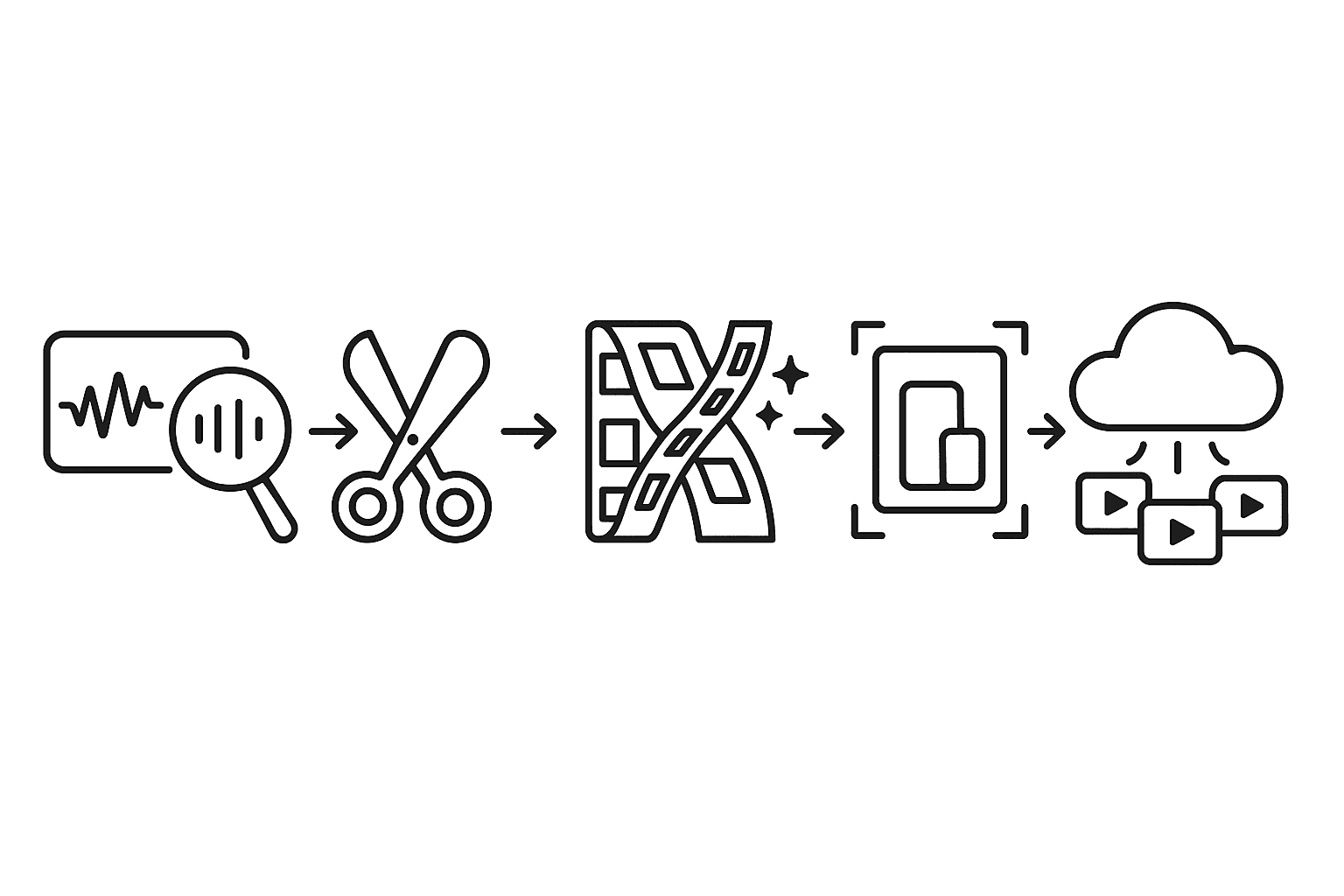
SimaDeliver transforms raw webinar recordings into distribution-ready assets through an integrated AI pipeline that addresses every stage from ideation to delivery. The system leverages AI preprocessing to automate content segmentation, B-roll creation, and format optimization--tasks that traditionally consume days of manual effort.
The workflow begins with intelligent content analysis. SimaDeliver's AI examines the full webinar recording, identifying natural break points, topic transitions, and high-engagement segments. This automated segmentation eliminates the manual shot-selection process that typically requires editors to scrub through hours of footage.
Next, the platform handles clip extraction with context awareness. Rather than arbitrary time-based cuts, SimaDeliver understands conversational flow and preserves complete thoughts. The SimaBit Premiere Pro plugin integrates directly into existing export workflows, allowing editors to apply AI optimization without additional software or complex rendering pipelines.
The system then optimizes each clip for its intended platform. SimaDeliver automatically adjusts aspect ratios, generates captions, and applies platform-specific encoding settings. The result: clips that are immediately ready for LinkedIn, YouTube Shorts, or internal knowledge bases without additional processing.
Generative Extend: Filling the Gaps Automatically
Generative Extend represents a breakthrough in automated B-roll creation. The tool allows editors to seamlessly add frames to make clips longer, addressing one of the most time-consuming aspects of webinar editing: filling awkward gaps and transitions.
The technology can generate up to 2 seconds of newly generated video at either the head or tail of clips. For webinar content, this means smooth transitions between speaker segments, professional-looking intro sequences, and polished endings--all generated automatically.
According to Adobe's documentation, "Video can be increased up to 2 seconds, audio up to 10 seconds." This capability eliminates the manual hunt for transition footage or the need to license stock B-roll. The AI analyzes existing frames and generates contextually appropriate extensions that maintain visual continuity.

SimaDeliver vs Manual Editing: Which Wins on Speed, Cost & Quality?
The numbers paint a clear picture. As SimaLabs reports, "Time-and-motion studies conducted across multiple social video teams reveal a 47% end-to-end reduction in post-production timelines when implementing this integrated approach."
Speed advantages compound at scale:
Manual editing: 40-50 hours for 40 clips
SimaDeliver: 21-26 hours for the same output
Time saved: 19-24 hours per webinar
Cost analysis reveals even starker contrasts. While the AI pipeline requires initial investment in software licensing and training, the payback period typically ranges from 3-6 months for active social video teams. After break-even, the savings accelerate--particularly for organizations producing weekly webinars.
Quality metrics tell an equally compelling story. SimaBit achieved a 22% average reduction in bitrate, a 4.2-point VMAF quality increase, and a 37% decrease in buffering events in benchmark tests. This means clips that not only process faster but actually perform better across distribution channels.
The compound effect becomes clear when you consider a team producing 40 clips from weekly webinars:
Annual time saved: 988-1,248 hours
Bandwidth reduction: 22% across all distributed content
Quality improvement: Consistent VMAF scores above manual baselines
Key AI Building Blocks Under the Hood
The technical foundation powering SimaDeliver's efficiency gains rests on three interconnected AI systems working in concert. High-frame-rate social content drives engagement like nothing else--viewers scroll past static posts but stop for buttery-smooth clips that feel almost cinematic.
Frame interpolation technology sits at the core. Rather than capturing at high frame rates (which multiplies storage and processing demands), the AI generates intermediate frames post-production. This selective enhancement allows editors to boost specific clips without shooting everything at maximum frame rates--a crucial efficiency for webinar content that's typically captured at standard rates.
The second pillar involves content-aware summarization through multimodal large language models. Vidi significantly outperforms leading proprietary models like GPT-4o and Gemini on temporal retrieval tasks, identifying specific time ranges within videos that correspond to given text queries. This capability enables SimaDeliver to automatically extract clips based on topic or question rather than manual timestamp marking.
Finally, SimaBit's preprocessing engine optimizes every frame before encoding. The AI analyzes scene complexity and predicts minimum bits needed for perceptual fidelity, dynamically adjusting compression parameters instead of relying on fixed rules. Lotus first creates an abstractive short-form video by generating both script and speech, then matching video clips to generated narration--a process SimaDeliver adapts for webinar atomization.
Why Bandwidth Reduction Still Matters in 2026
Bandwidth optimization isn't just about storage costs--it's about reach and engagement. Generative AI video models act like a smart pre-filter in front of any encoder, predicting perceptual redundancies and reconstructing fine detail after compression.
The impact cascades through the entire distribution chain:
CDN costs: 22% bandwidth reduction translates directly to infrastructure savings
Mobile performance: Smaller files load faster on cellular networks
Platform limits: Stay within upload restrictions while maintaining quality
Viewer experience: Reduced buffering increases watch time
AI-enhanced preprocessing engines demonstrate the ability to reduce video bandwidth requirements by 22% or more while boosting perceptual quality. For organizations distributing 40+ clips weekly, these savings compound into significant operational advantages.
Video conferencing platforms like Zoom require at least 1.2 Mbps bandwidth for 720p calls. SimaDeliver's optimization ensures webinar clips stream smoothly even on constrained networks, expanding potential audience reach.
How Do You Roll Out 40+ Webinar Clips in One Week?
Successful implementation starts with workflow integration, not wholesale replacement. AI preprocessing offers significant advantages including reduced bandwidth requirements, improved quality consistency, and lower CDN costs--but only when properly integrated into existing pipelines.
Begin with pilot testing on high-value webinars. Select sessions with clear segmentation opportunities--product demos, Q&A sessions, or multi-speaker panels work particularly well. Transcribe, caption, and translate natively within your editing platform to establish baseline timings.
The phased rollout approach minimizes disruption:
Week 1: Configure SimaDeliver for automatic clip extraction
Week 2: Enable Generative Extend for transition smoothing
Week 3: Activate SimaBit preprocessing for bandwidth optimization
Week 4: Full pipeline deployment with platform-specific outputs
VideoDiff simplifies comparisons by aligning videos and highlighting differences through timelines, transcripts, and video previews. Use this capability to validate AI-generated clips against manual edits during the transition period.
Critical success factors include setting clear quality benchmarks, establishing feedback loops with stakeholders, and maintaining version control throughout the migration. The goal isn't to eliminate human oversight but to redirect editorial effort toward creative decisions rather than mechanical tasks.
Key takeaway: Start small, measure everything, and scale based on demonstrated wins rather than theoretical benefits.
What Pitfalls Derail Bulk Video Editing--and How Does SimaDeliver Avoid Them?
The most common failure point in automated video workflows isn't technology--it's inadequate planning for edge cases. Premiere Pro now supports content credentials, allowing clips with generated frames to be labeled for authenticity. This transparency prevents the "uncanny valley" effect that can damage brand credibility.
Cloud cost overruns represent another hidden danger. Traditional video compression algorithms exhibit significant quality degradation at extremely low bitrates, leading teams to over-provision bandwidth. SimaDeliver's intelligent preprocessing sidesteps this trap by optimizing quality before compression, achieving better results with less computational overhead.
File format incompatibilities can derail entire workflows. SimaDeliver maintains compatibility across formats while NIER achieves 205ms median end-to-end latency under ultra-low bandwidth conditions. This flexibility ensures clips work across all distribution channels without manual conversion.
The platform also addresses the hallucination risk inherent in generative AI. By constraining generation to short extensions and maintaining source fidelity, SimaDeliver avoids the factual errors that plague fully synthetic content. Every generated frame remains grounded in actual webinar footage, preserving authenticity while enhancing production value.
Move From Clip Chaos to Constant Pipeline
The shift from reactive editing to proactive content pipelines represents more than operational efficiency--it's a fundamental reimagining of webinar ROI. Teams implementing the complete AI pipeline achieved an average 47% reduction in end-to-end production time, but the real transformation lies in what becomes possible when editing isn't the bottleneck.
SimaDeliver enables a constant content pipeline where webinar value extends far beyond the live event. Time-and-motion studies reveal teams can now extract 40+ targeted clips in the time it previously took to create 5-10 basic excerpts. Each clip arrives pre-optimized for its distribution channel, with captions, transitions, and bandwidth optimization already applied.
The compound effect accelerates over time. While the AI pipeline requires initial investment in software licensing and training, the payback period of 3-6 months gives way to sustained competitive advantage. Teams that previously struggled to extract value from their webinar archives can now systematically mine hundreds of hours of content for social media, sales enablement, and knowledge management.
For organizations serious about scaling their webinar programs, the choice isn't between manual and automated editing--it's between keeping pace with audience expectations or falling behind competitors who've already made the switch. SimaDeliver doesn't just accelerate clip production; it fundamentally changes what's possible when webinar content can flow seamlessly from capture to distribution without human bottlenecks constraining the pipeline.
Frequently Asked Questions
What are the benefits of using SimaDeliver for webinar clip editing?
SimaDeliver automates the editing process, reducing the time required from 40-50 hours to 21-26 hours for 40 clips. It also enhances video quality and reduces bandwidth usage, making it a cost-effective solution for high-volume content production.
How does SimaDeliver improve the quality of webinar clips?
SimaDeliver uses AI to optimize video quality by reducing bitrate and increasing VMAF scores, ensuring clips perform better across distribution channels. It also automates B-roll creation and format optimization for various platforms.
What are the hidden costs of manual webinar clip editing?
Manual editing is time-consuming, often taking 40-50 hours for 40 clips, leading to delays and higher opportunity costs. Editor rates and the need for quick turnaround times further increase expenses, making manual editing less efficient.
How does SimaDeliver handle clip extraction and optimization?
SimaDeliver uses AI to analyze webinar recordings, identify key segments, and automate clip extraction. It optimizes clips for specific platforms by adjusting aspect ratios, generating captions, and applying encoding settings.
What is the impact of SimaDeliver on bandwidth and CDN costs?
SimaDeliver reduces video bandwidth requirements by 22%, leading to significant savings in CDN costs. This optimization ensures smooth streaming even on constrained networks, enhancing viewer experience and reach.
Sources
https://www.simalabs.ai/resources/how-generative-ai-video-models-enhance-streaming-q-c9ec72f0
https://goldcastinc.com/blog/b2b-webinar-benchmarks-report-2025
https://provideocoalition.com/burning-questions-about-generative-extend-in-premiere-pro-beta
https://www.simalabs.ai/resources/ai-enhanced-ugc-streaming-2030-av2-edge-gpu-simabit
https://www.payscale.com/research/US/Job=Freelance_Video_Editor/Hourly_Rate
https://goldcastinc.com/blog/b2b-webinar-benchmarks-report-2024
https://zhan6841.github.io/assets/pdf/paper/nier-sigcomm25.pdf
Bulk Edit 40+ Webinar Clips: SimaDeliver vs Manual Editing
For bulk editing 40+ webinar clips, SimaDeliver's AI pipeline delivers 47% faster turnaround compared to manual workflows, automating clip extraction, B-roll generation, and platform-specific optimization. Manual editing requires 40-50 hours per webinar for 40 clips, while SimaDeliver completes the same work in 21-26 hours with 22% bandwidth reduction and improved quality scores.
TLDR
Manual editing of 40+ webinar clips takes 40-50 hours versus 21-26 hours with SimaDeliver's automated pipeline
Companies created 131,296 video clips from webinars in 2024, a 2,903% increase year-over-year
SimaDeliver achieves 22% bandwidth reduction while improving VMAF quality scores by 4.2 points
Generative Extend can automatically create up to 2 seconds of new video for smooth transitions
Typical ROI payback period ranges from 3-6 months for teams producing weekly webinars
Bulk editing webinar clips is no longer a nice-to-have; it's the only way B2B teams can keep pace with the 225% YoY surge in webinar output without ballooning budgets. Companies are now creating over 131,000 video clips from webinars annually, yet manual editing workflows drain 3-4 hours per session just to extract basic deliverables. When you multiply that across 40+ clips, traditional post-production becomes a bottleneck that SimaDeliver's AI pipeline eliminates through automated clip creation, intelligent B-roll generation, and bandwidth-optimized exports.
Why Bulk Editing Webinar Clips Matters in 2026
The webinar landscape has fundamentally shifted. B2B organizations increased their webinar output by 225% since last year, with companies now hosting an average of 22 webinars annually. This explosion isn't just about quantity--it's about maximizing content ROI through strategic clip repurposing.
The rapid growth of online video content, especially on short video platforms, has created unprecedented demand for efficient webinar video editing techniques. Short-form videos capture viewers' attention instantly on platforms like TikTok and Instagram, making clip extraction from longer webinars mission-critical for B2B marketing teams.
What's driving this urgency? The numbers tell the story. Companies created 131,296 video clips from webinars in 2024--a staggering 2,903% increase from the previous year. Each clip represents a potential touchpoint, a social media asset, or a nurture campaign component. But here's the catch: extracting value from these recordings requires sophisticated editing capabilities that manual workflows simply can't deliver at scale.
The Global Media Streaming Market is projected to grow from USD 104.2 billion in 2024 to USD 285.4 billion by 2034. Within this ecosystem, webinar content represents a unique challenge--it must be atomized, optimized, and distributed across multiple channels while maintaining quality and message coherence.
What Are the Hidden Costs of Manual Webinar Clip Editing?
Manual editing carries costs that extend far beyond hourly rates. Editor rates typically range from $30-$65 per hour depending on experience, but the real expense lies in time-to-market delays and opportunity costs.
Consider the baseline metrics: The average hourly pay for a freelance video editor is $20.00 in 2025, with ranges spanning $11-$24 per hour. For specialized webinar editing, these rates climb higher. Companies hosting 22 webinars annually face a daunting math problem when each session requires hours of post-production.
The timeline burden compounds quickly:
Basic clip extraction: 3-4 hours per webinar
B-roll sourcing and integration: 2-3 additional hours
Format optimization for multiple platforms: 1-2 hours
Quality control and revisions: 1-2 hours
For 40 clips from a single webinar, manual processes can stretch to 40-50 hours of editing time. This doesn't account for coordination overhead, feedback loops, or the reality that most teams need clips within 24-48 hours to capitalize on engagement momentum. The 69% increase in webinar frequency means these bottlenecks now occur weekly rather than monthly.
Key takeaway: Manual editing creates a cascading delay effect--by the time clips are ready, the moment for maximum impact has often passed.
How Does SimaDeliver Automate Clip Creation From Raw Webinars?
SimaDeliver transforms raw webinar recordings into distribution-ready assets through an integrated AI pipeline that addresses every stage from ideation to delivery. The system leverages AI preprocessing to automate content segmentation, B-roll creation, and format optimization--tasks that traditionally consume days of manual effort.
The workflow begins with intelligent content analysis. SimaDeliver's AI examines the full webinar recording, identifying natural break points, topic transitions, and high-engagement segments. This automated segmentation eliminates the manual shot-selection process that typically requires editors to scrub through hours of footage.
Next, the platform handles clip extraction with context awareness. Rather than arbitrary time-based cuts, SimaDeliver understands conversational flow and preserves complete thoughts. The SimaBit Premiere Pro plugin integrates directly into existing export workflows, allowing editors to apply AI optimization without additional software or complex rendering pipelines.
The system then optimizes each clip for its intended platform. SimaDeliver automatically adjusts aspect ratios, generates captions, and applies platform-specific encoding settings. The result: clips that are immediately ready for LinkedIn, YouTube Shorts, or internal knowledge bases without additional processing.
Generative Extend: Filling the Gaps Automatically
Generative Extend represents a breakthrough in automated B-roll creation. The tool allows editors to seamlessly add frames to make clips longer, addressing one of the most time-consuming aspects of webinar editing: filling awkward gaps and transitions.
The technology can generate up to 2 seconds of newly generated video at either the head or tail of clips. For webinar content, this means smooth transitions between speaker segments, professional-looking intro sequences, and polished endings--all generated automatically.
According to Adobe's documentation, "Video can be increased up to 2 seconds, audio up to 10 seconds." This capability eliminates the manual hunt for transition footage or the need to license stock B-roll. The AI analyzes existing frames and generates contextually appropriate extensions that maintain visual continuity.
SimaDeliver vs Manual Editing: Which Wins on Speed, Cost & Quality?
The numbers paint a clear picture. As SimaLabs reports, "Time-and-motion studies conducted across multiple social video teams reveal a 47% end-to-end reduction in post-production timelines when implementing this integrated approach."
Speed advantages compound at scale:
Manual editing: 40-50 hours for 40 clips
SimaDeliver: 21-26 hours for the same output
Time saved: 19-24 hours per webinar
Cost analysis reveals even starker contrasts. While the AI pipeline requires initial investment in software licensing and training, the payback period typically ranges from 3-6 months for active social video teams. After break-even, the savings accelerate--particularly for organizations producing weekly webinars.
Quality metrics tell an equally compelling story. SimaBit achieved a 22% average reduction in bitrate, a 4.2-point VMAF quality increase, and a 37% decrease in buffering events in benchmark tests. This means clips that not only process faster but actually perform better across distribution channels.
The compound effect becomes clear when you consider a team producing 40 clips from weekly webinars:
Annual time saved: 988-1,248 hours
Bandwidth reduction: 22% across all distributed content
Quality improvement: Consistent VMAF scores above manual baselines
Key AI Building Blocks Under the Hood
The technical foundation powering SimaDeliver's efficiency gains rests on three interconnected AI systems working in concert. High-frame-rate social content drives engagement like nothing else--viewers scroll past static posts but stop for buttery-smooth clips that feel almost cinematic.
Frame interpolation technology sits at the core. Rather than capturing at high frame rates (which multiplies storage and processing demands), the AI generates intermediate frames post-production. This selective enhancement allows editors to boost specific clips without shooting everything at maximum frame rates--a crucial efficiency for webinar content that's typically captured at standard rates.
The second pillar involves content-aware summarization through multimodal large language models. Vidi significantly outperforms leading proprietary models like GPT-4o and Gemini on temporal retrieval tasks, identifying specific time ranges within videos that correspond to given text queries. This capability enables SimaDeliver to automatically extract clips based on topic or question rather than manual timestamp marking.
Finally, SimaBit's preprocessing engine optimizes every frame before encoding. The AI analyzes scene complexity and predicts minimum bits needed for perceptual fidelity, dynamically adjusting compression parameters instead of relying on fixed rules. Lotus first creates an abstractive short-form video by generating both script and speech, then matching video clips to generated narration--a process SimaDeliver adapts for webinar atomization.
Why Bandwidth Reduction Still Matters in 2026
Bandwidth optimization isn't just about storage costs--it's about reach and engagement. Generative AI video models act like a smart pre-filter in front of any encoder, predicting perceptual redundancies and reconstructing fine detail after compression.
The impact cascades through the entire distribution chain:
CDN costs: 22% bandwidth reduction translates directly to infrastructure savings
Mobile performance: Smaller files load faster on cellular networks
Platform limits: Stay within upload restrictions while maintaining quality
Viewer experience: Reduced buffering increases watch time
AI-enhanced preprocessing engines demonstrate the ability to reduce video bandwidth requirements by 22% or more while boosting perceptual quality. For organizations distributing 40+ clips weekly, these savings compound into significant operational advantages.
Video conferencing platforms like Zoom require at least 1.2 Mbps bandwidth for 720p calls. SimaDeliver's optimization ensures webinar clips stream smoothly even on constrained networks, expanding potential audience reach.
How Do You Roll Out 40+ Webinar Clips in One Week?
Successful implementation starts with workflow integration, not wholesale replacement. AI preprocessing offers significant advantages including reduced bandwidth requirements, improved quality consistency, and lower CDN costs--but only when properly integrated into existing pipelines.
Begin with pilot testing on high-value webinars. Select sessions with clear segmentation opportunities--product demos, Q&A sessions, or multi-speaker panels work particularly well. Transcribe, caption, and translate natively within your editing platform to establish baseline timings.
The phased rollout approach minimizes disruption:
Week 1: Configure SimaDeliver for automatic clip extraction
Week 2: Enable Generative Extend for transition smoothing
Week 3: Activate SimaBit preprocessing for bandwidth optimization
Week 4: Full pipeline deployment with platform-specific outputs
VideoDiff simplifies comparisons by aligning videos and highlighting differences through timelines, transcripts, and video previews. Use this capability to validate AI-generated clips against manual edits during the transition period.
Critical success factors include setting clear quality benchmarks, establishing feedback loops with stakeholders, and maintaining version control throughout the migration. The goal isn't to eliminate human oversight but to redirect editorial effort toward creative decisions rather than mechanical tasks.
Key takeaway: Start small, measure everything, and scale based on demonstrated wins rather than theoretical benefits.
What Pitfalls Derail Bulk Video Editing--and How Does SimaDeliver Avoid Them?
The most common failure point in automated video workflows isn't technology--it's inadequate planning for edge cases. Premiere Pro now supports content credentials, allowing clips with generated frames to be labeled for authenticity. This transparency prevents the "uncanny valley" effect that can damage brand credibility.
Cloud cost overruns represent another hidden danger. Traditional video compression algorithms exhibit significant quality degradation at extremely low bitrates, leading teams to over-provision bandwidth. SimaDeliver's intelligent preprocessing sidesteps this trap by optimizing quality before compression, achieving better results with less computational overhead.
File format incompatibilities can derail entire workflows. SimaDeliver maintains compatibility across formats while NIER achieves 205ms median end-to-end latency under ultra-low bandwidth conditions. This flexibility ensures clips work across all distribution channels without manual conversion.
The platform also addresses the hallucination risk inherent in generative AI. By constraining generation to short extensions and maintaining source fidelity, SimaDeliver avoids the factual errors that plague fully synthetic content. Every generated frame remains grounded in actual webinar footage, preserving authenticity while enhancing production value.
Move From Clip Chaos to Constant Pipeline
The shift from reactive editing to proactive content pipelines represents more than operational efficiency--it's a fundamental reimagining of webinar ROI. Teams implementing the complete AI pipeline achieved an average 47% reduction in end-to-end production time, but the real transformation lies in what becomes possible when editing isn't the bottleneck.
SimaDeliver enables a constant content pipeline where webinar value extends far beyond the live event. Time-and-motion studies reveal teams can now extract 40+ targeted clips in the time it previously took to create 5-10 basic excerpts. Each clip arrives pre-optimized for its distribution channel, with captions, transitions, and bandwidth optimization already applied.
The compound effect accelerates over time. While the AI pipeline requires initial investment in software licensing and training, the payback period of 3-6 months gives way to sustained competitive advantage. Teams that previously struggled to extract value from their webinar archives can now systematically mine hundreds of hours of content for social media, sales enablement, and knowledge management.
For organizations serious about scaling their webinar programs, the choice isn't between manual and automated editing--it's between keeping pace with audience expectations or falling behind competitors who've already made the switch. SimaDeliver doesn't just accelerate clip production; it fundamentally changes what's possible when webinar content can flow seamlessly from capture to distribution without human bottlenecks constraining the pipeline.
Frequently Asked Questions
What are the benefits of using SimaDeliver for webinar clip editing?
SimaDeliver automates the editing process, reducing the time required from 40-50 hours to 21-26 hours for 40 clips. It also enhances video quality and reduces bandwidth usage, making it a cost-effective solution for high-volume content production.
How does SimaDeliver improve the quality of webinar clips?
SimaDeliver uses AI to optimize video quality by reducing bitrate and increasing VMAF scores, ensuring clips perform better across distribution channels. It also automates B-roll creation and format optimization for various platforms.
What are the hidden costs of manual webinar clip editing?
Manual editing is time-consuming, often taking 40-50 hours for 40 clips, leading to delays and higher opportunity costs. Editor rates and the need for quick turnaround times further increase expenses, making manual editing less efficient.
How does SimaDeliver handle clip extraction and optimization?
SimaDeliver uses AI to analyze webinar recordings, identify key segments, and automate clip extraction. It optimizes clips for specific platforms by adjusting aspect ratios, generating captions, and applying encoding settings.
What is the impact of SimaDeliver on bandwidth and CDN costs?
SimaDeliver reduces video bandwidth requirements by 22%, leading to significant savings in CDN costs. This optimization ensures smooth streaming even on constrained networks, enhancing viewer experience and reach.
Sources
https://www.simalabs.ai/resources/how-generative-ai-video-models-enhance-streaming-q-c9ec72f0
https://goldcastinc.com/blog/b2b-webinar-benchmarks-report-2025
https://provideocoalition.com/burning-questions-about-generative-extend-in-premiere-pro-beta
https://www.simalabs.ai/resources/ai-enhanced-ugc-streaming-2030-av2-edge-gpu-simabit
https://www.payscale.com/research/US/Job=Freelance_Video_Editor/Hourly_Rate
https://goldcastinc.com/blog/b2b-webinar-benchmarks-report-2024
https://zhan6841.github.io/assets/pdf/paper/nier-sigcomm25.pdf
Bulk Edit 40+ Webinar Clips: SimaDeliver vs Manual Editing
For bulk editing 40+ webinar clips, SimaDeliver's AI pipeline delivers 47% faster turnaround compared to manual workflows, automating clip extraction, B-roll generation, and platform-specific optimization. Manual editing requires 40-50 hours per webinar for 40 clips, while SimaDeliver completes the same work in 21-26 hours with 22% bandwidth reduction and improved quality scores.
TLDR
Manual editing of 40+ webinar clips takes 40-50 hours versus 21-26 hours with SimaDeliver's automated pipeline
Companies created 131,296 video clips from webinars in 2024, a 2,903% increase year-over-year
SimaDeliver achieves 22% bandwidth reduction while improving VMAF quality scores by 4.2 points
Generative Extend can automatically create up to 2 seconds of new video for smooth transitions
Typical ROI payback period ranges from 3-6 months for teams producing weekly webinars
Bulk editing webinar clips is no longer a nice-to-have; it's the only way B2B teams can keep pace with the 225% YoY surge in webinar output without ballooning budgets. Companies are now creating over 131,000 video clips from webinars annually, yet manual editing workflows drain 3-4 hours per session just to extract basic deliverables. When you multiply that across 40+ clips, traditional post-production becomes a bottleneck that SimaDeliver's AI pipeline eliminates through automated clip creation, intelligent B-roll generation, and bandwidth-optimized exports.
Why Bulk Editing Webinar Clips Matters in 2026
The webinar landscape has fundamentally shifted. B2B organizations increased their webinar output by 225% since last year, with companies now hosting an average of 22 webinars annually. This explosion isn't just about quantity--it's about maximizing content ROI through strategic clip repurposing.
The rapid growth of online video content, especially on short video platforms, has created unprecedented demand for efficient webinar video editing techniques. Short-form videos capture viewers' attention instantly on platforms like TikTok and Instagram, making clip extraction from longer webinars mission-critical for B2B marketing teams.
What's driving this urgency? The numbers tell the story. Companies created 131,296 video clips from webinars in 2024--a staggering 2,903% increase from the previous year. Each clip represents a potential touchpoint, a social media asset, or a nurture campaign component. But here's the catch: extracting value from these recordings requires sophisticated editing capabilities that manual workflows simply can't deliver at scale.
The Global Media Streaming Market is projected to grow from USD 104.2 billion in 2024 to USD 285.4 billion by 2034. Within this ecosystem, webinar content represents a unique challenge--it must be atomized, optimized, and distributed across multiple channels while maintaining quality and message coherence.
What Are the Hidden Costs of Manual Webinar Clip Editing?
Manual editing carries costs that extend far beyond hourly rates. Editor rates typically range from $30-$65 per hour depending on experience, but the real expense lies in time-to-market delays and opportunity costs.
Consider the baseline metrics: The average hourly pay for a freelance video editor is $20.00 in 2025, with ranges spanning $11-$24 per hour. For specialized webinar editing, these rates climb higher. Companies hosting 22 webinars annually face a daunting math problem when each session requires hours of post-production.
The timeline burden compounds quickly:
Basic clip extraction: 3-4 hours per webinar
B-roll sourcing and integration: 2-3 additional hours
Format optimization for multiple platforms: 1-2 hours
Quality control and revisions: 1-2 hours
For 40 clips from a single webinar, manual processes can stretch to 40-50 hours of editing time. This doesn't account for coordination overhead, feedback loops, or the reality that most teams need clips within 24-48 hours to capitalize on engagement momentum. The 69% increase in webinar frequency means these bottlenecks now occur weekly rather than monthly.
Key takeaway: Manual editing creates a cascading delay effect--by the time clips are ready, the moment for maximum impact has often passed.
How Does SimaDeliver Automate Clip Creation From Raw Webinars?
SimaDeliver transforms raw webinar recordings into distribution-ready assets through an integrated AI pipeline that addresses every stage from ideation to delivery. The system leverages AI preprocessing to automate content segmentation, B-roll creation, and format optimization--tasks that traditionally consume days of manual effort.
The workflow begins with intelligent content analysis. SimaDeliver's AI examines the full webinar recording, identifying natural break points, topic transitions, and high-engagement segments. This automated segmentation eliminates the manual shot-selection process that typically requires editors to scrub through hours of footage.
Next, the platform handles clip extraction with context awareness. Rather than arbitrary time-based cuts, SimaDeliver understands conversational flow and preserves complete thoughts. The SimaBit Premiere Pro plugin integrates directly into existing export workflows, allowing editors to apply AI optimization without additional software or complex rendering pipelines.
The system then optimizes each clip for its intended platform. SimaDeliver automatically adjusts aspect ratios, generates captions, and applies platform-specific encoding settings. The result: clips that are immediately ready for LinkedIn, YouTube Shorts, or internal knowledge bases without additional processing.
Generative Extend: Filling the Gaps Automatically
Generative Extend represents a breakthrough in automated B-roll creation. The tool allows editors to seamlessly add frames to make clips longer, addressing one of the most time-consuming aspects of webinar editing: filling awkward gaps and transitions.
The technology can generate up to 2 seconds of newly generated video at either the head or tail of clips. For webinar content, this means smooth transitions between speaker segments, professional-looking intro sequences, and polished endings--all generated automatically.
According to Adobe's documentation, "Video can be increased up to 2 seconds, audio up to 10 seconds." This capability eliminates the manual hunt for transition footage or the need to license stock B-roll. The AI analyzes existing frames and generates contextually appropriate extensions that maintain visual continuity.
SimaDeliver vs Manual Editing: Which Wins on Speed, Cost & Quality?
The numbers paint a clear picture. As SimaLabs reports, "Time-and-motion studies conducted across multiple social video teams reveal a 47% end-to-end reduction in post-production timelines when implementing this integrated approach."
Speed advantages compound at scale:
Manual editing: 40-50 hours for 40 clips
SimaDeliver: 21-26 hours for the same output
Time saved: 19-24 hours per webinar
Cost analysis reveals even starker contrasts. While the AI pipeline requires initial investment in software licensing and training, the payback period typically ranges from 3-6 months for active social video teams. After break-even, the savings accelerate--particularly for organizations producing weekly webinars.
Quality metrics tell an equally compelling story. SimaBit achieved a 22% average reduction in bitrate, a 4.2-point VMAF quality increase, and a 37% decrease in buffering events in benchmark tests. This means clips that not only process faster but actually perform better across distribution channels.
The compound effect becomes clear when you consider a team producing 40 clips from weekly webinars:
Annual time saved: 988-1,248 hours
Bandwidth reduction: 22% across all distributed content
Quality improvement: Consistent VMAF scores above manual baselines
Key AI Building Blocks Under the Hood
The technical foundation powering SimaDeliver's efficiency gains rests on three interconnected AI systems working in concert. High-frame-rate social content drives engagement like nothing else--viewers scroll past static posts but stop for buttery-smooth clips that feel almost cinematic.
Frame interpolation technology sits at the core. Rather than capturing at high frame rates (which multiplies storage and processing demands), the AI generates intermediate frames post-production. This selective enhancement allows editors to boost specific clips without shooting everything at maximum frame rates--a crucial efficiency for webinar content that's typically captured at standard rates.
The second pillar involves content-aware summarization through multimodal large language models. Vidi significantly outperforms leading proprietary models like GPT-4o and Gemini on temporal retrieval tasks, identifying specific time ranges within videos that correspond to given text queries. This capability enables SimaDeliver to automatically extract clips based on topic or question rather than manual timestamp marking.
Finally, SimaBit's preprocessing engine optimizes every frame before encoding. The AI analyzes scene complexity and predicts minimum bits needed for perceptual fidelity, dynamically adjusting compression parameters instead of relying on fixed rules. Lotus first creates an abstractive short-form video by generating both script and speech, then matching video clips to generated narration--a process SimaDeliver adapts for webinar atomization.
Why Bandwidth Reduction Still Matters in 2026
Bandwidth optimization isn't just about storage costs--it's about reach and engagement. Generative AI video models act like a smart pre-filter in front of any encoder, predicting perceptual redundancies and reconstructing fine detail after compression.
The impact cascades through the entire distribution chain:
CDN costs: 22% bandwidth reduction translates directly to infrastructure savings
Mobile performance: Smaller files load faster on cellular networks
Platform limits: Stay within upload restrictions while maintaining quality
Viewer experience: Reduced buffering increases watch time
AI-enhanced preprocessing engines demonstrate the ability to reduce video bandwidth requirements by 22% or more while boosting perceptual quality. For organizations distributing 40+ clips weekly, these savings compound into significant operational advantages.
Video conferencing platforms like Zoom require at least 1.2 Mbps bandwidth for 720p calls. SimaDeliver's optimization ensures webinar clips stream smoothly even on constrained networks, expanding potential audience reach.
How Do You Roll Out 40+ Webinar Clips in One Week?
Successful implementation starts with workflow integration, not wholesale replacement. AI preprocessing offers significant advantages including reduced bandwidth requirements, improved quality consistency, and lower CDN costs--but only when properly integrated into existing pipelines.
Begin with pilot testing on high-value webinars. Select sessions with clear segmentation opportunities--product demos, Q&A sessions, or multi-speaker panels work particularly well. Transcribe, caption, and translate natively within your editing platform to establish baseline timings.
The phased rollout approach minimizes disruption:
Week 1: Configure SimaDeliver for automatic clip extraction
Week 2: Enable Generative Extend for transition smoothing
Week 3: Activate SimaBit preprocessing for bandwidth optimization
Week 4: Full pipeline deployment with platform-specific outputs
VideoDiff simplifies comparisons by aligning videos and highlighting differences through timelines, transcripts, and video previews. Use this capability to validate AI-generated clips against manual edits during the transition period.
Critical success factors include setting clear quality benchmarks, establishing feedback loops with stakeholders, and maintaining version control throughout the migration. The goal isn't to eliminate human oversight but to redirect editorial effort toward creative decisions rather than mechanical tasks.
Key takeaway: Start small, measure everything, and scale based on demonstrated wins rather than theoretical benefits.
What Pitfalls Derail Bulk Video Editing--and How Does SimaDeliver Avoid Them?
The most common failure point in automated video workflows isn't technology--it's inadequate planning for edge cases. Premiere Pro now supports content credentials, allowing clips with generated frames to be labeled for authenticity. This transparency prevents the "uncanny valley" effect that can damage brand credibility.
Cloud cost overruns represent another hidden danger. Traditional video compression algorithms exhibit significant quality degradation at extremely low bitrates, leading teams to over-provision bandwidth. SimaDeliver's intelligent preprocessing sidesteps this trap by optimizing quality before compression, achieving better results with less computational overhead.
File format incompatibilities can derail entire workflows. SimaDeliver maintains compatibility across formats while NIER achieves 205ms median end-to-end latency under ultra-low bandwidth conditions. This flexibility ensures clips work across all distribution channels without manual conversion.
The platform also addresses the hallucination risk inherent in generative AI. By constraining generation to short extensions and maintaining source fidelity, SimaDeliver avoids the factual errors that plague fully synthetic content. Every generated frame remains grounded in actual webinar footage, preserving authenticity while enhancing production value.
Move From Clip Chaos to Constant Pipeline
The shift from reactive editing to proactive content pipelines represents more than operational efficiency--it's a fundamental reimagining of webinar ROI. Teams implementing the complete AI pipeline achieved an average 47% reduction in end-to-end production time, but the real transformation lies in what becomes possible when editing isn't the bottleneck.
SimaDeliver enables a constant content pipeline where webinar value extends far beyond the live event. Time-and-motion studies reveal teams can now extract 40+ targeted clips in the time it previously took to create 5-10 basic excerpts. Each clip arrives pre-optimized for its distribution channel, with captions, transitions, and bandwidth optimization already applied.
The compound effect accelerates over time. While the AI pipeline requires initial investment in software licensing and training, the payback period of 3-6 months gives way to sustained competitive advantage. Teams that previously struggled to extract value from their webinar archives can now systematically mine hundreds of hours of content for social media, sales enablement, and knowledge management.
For organizations serious about scaling their webinar programs, the choice isn't between manual and automated editing--it's between keeping pace with audience expectations or falling behind competitors who've already made the switch. SimaDeliver doesn't just accelerate clip production; it fundamentally changes what's possible when webinar content can flow seamlessly from capture to distribution without human bottlenecks constraining the pipeline.
Frequently Asked Questions
What are the benefits of using SimaDeliver for webinar clip editing?
SimaDeliver automates the editing process, reducing the time required from 40-50 hours to 21-26 hours for 40 clips. It also enhances video quality and reduces bandwidth usage, making it a cost-effective solution for high-volume content production.
How does SimaDeliver improve the quality of webinar clips?
SimaDeliver uses AI to optimize video quality by reducing bitrate and increasing VMAF scores, ensuring clips perform better across distribution channels. It also automates B-roll creation and format optimization for various platforms.
What are the hidden costs of manual webinar clip editing?
Manual editing is time-consuming, often taking 40-50 hours for 40 clips, leading to delays and higher opportunity costs. Editor rates and the need for quick turnaround times further increase expenses, making manual editing less efficient.
How does SimaDeliver handle clip extraction and optimization?
SimaDeliver uses AI to analyze webinar recordings, identify key segments, and automate clip extraction. It optimizes clips for specific platforms by adjusting aspect ratios, generating captions, and applying encoding settings.
What is the impact of SimaDeliver on bandwidth and CDN costs?
SimaDeliver reduces video bandwidth requirements by 22%, leading to significant savings in CDN costs. This optimization ensures smooth streaming even on constrained networks, enhancing viewer experience and reach.
Sources
https://www.simalabs.ai/resources/how-generative-ai-video-models-enhance-streaming-q-c9ec72f0
https://goldcastinc.com/blog/b2b-webinar-benchmarks-report-2025
https://provideocoalition.com/burning-questions-about-generative-extend-in-premiere-pro-beta
https://www.simalabs.ai/resources/ai-enhanced-ugc-streaming-2030-av2-edge-gpu-simabit
https://www.payscale.com/research/US/Job=Freelance_Video_Editor/Hourly_Rate
https://goldcastinc.com/blog/b2b-webinar-benchmarks-report-2024
https://zhan6841.github.io/assets/pdf/paper/nier-sigcomm25.pdf
SimaLabs
©2025 Sima Labs. All rights reserved
SimaLabs
©2025 Sima Labs. All rights reserved
SimaLabs
©2025 Sima Labs. All rights reserved